
Time tracking for your seasonal workers,
greenhouse after greenhouse
In season, the team grows from one day to the next. Everyone clocks in from their smartphone, in the fields as in the greenhouse, where they scan the QR code displayed at the entrance. PulseTime records their hours day by day, for payroll.
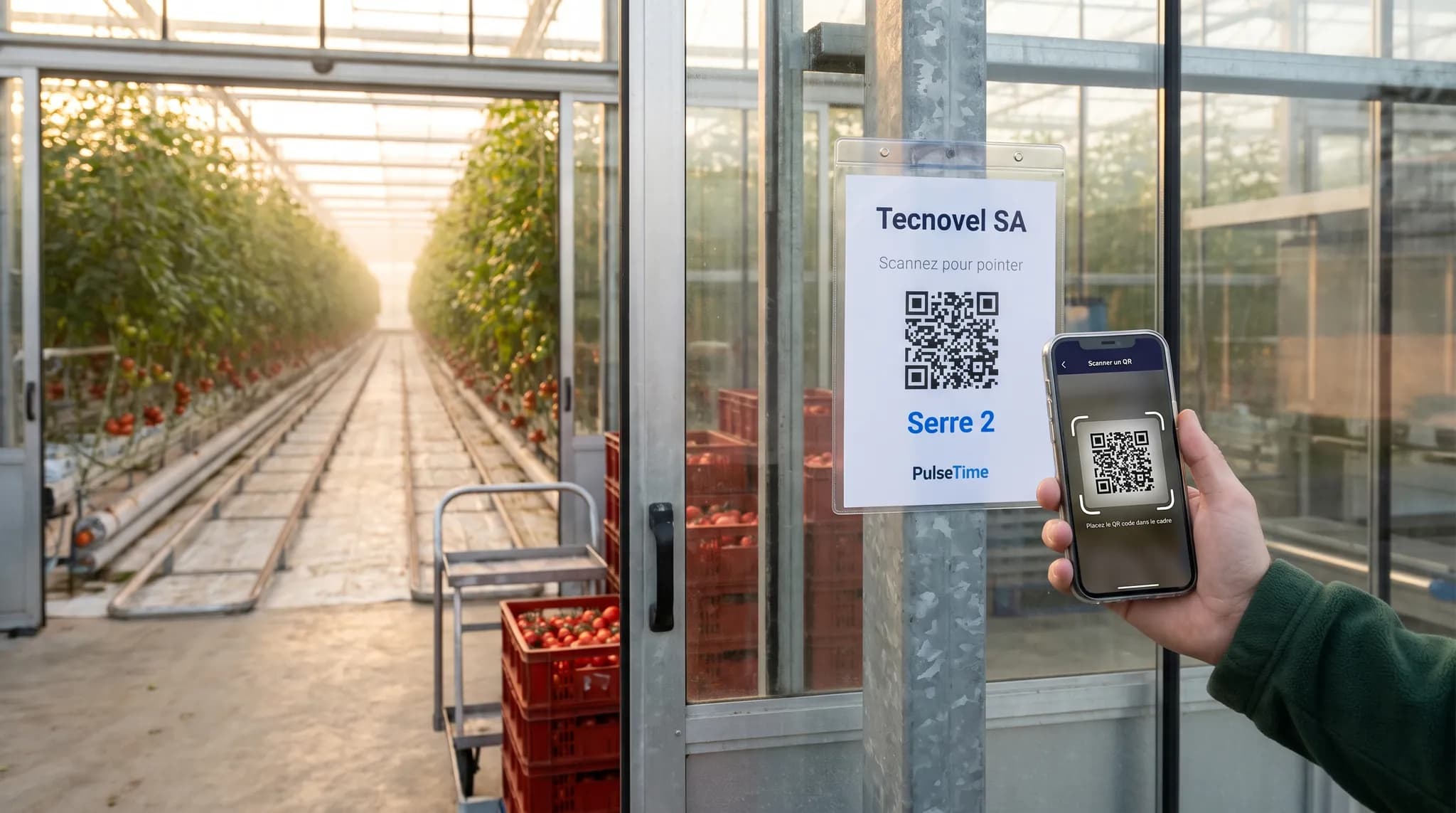
How your teams clock in at the greenhouse and in the fields
Everyone clocks in from their smartphone, with the PulseTime Mobile app. At the greenhouse, they scan the QR code displayed at the entrance. For those without a smartphone, a tablet will do, in the shed where the team meets in the morning.
From the smartphone
In the fields, the seasonal worker taps “Start” in the PulseTime Mobile app when beginning the day, and “Stop” when finishing it. At the greenhouse, they scan the QR code displayed at the entrance. Without a network, the clocking stays on the smartphone and is sent as soon as the connection returns.
A seasonal worker ready on day one
You add them in PulseTime, and they receive their invitation by e-mail or text message. They install the PulseTime Mobile app and clock in from the moment they arrive.
A tablet for those without a smartphone
A seasonal worker without a smartphone taps their name on the tablet in the shed and enters their PIN. An Android tablet or an iPad will do, and there is no time clock to buy.
In their own language
Each team member can use the app in French, Dutch, English or German. To clock in, tapping “Start” or scanning the QR code is enough.
What PulseTime brings to your farm
The hours actually worked by each seasonal worker, day after day, ready for payroll.
Who is here this morning
The dashboard shows who has clocked in, who is on a break and who has left. You can check it from your smartphone, even out in the fields.
The hours of each greenhouse
Each greenhouse, orchard or shed can become a work location, with its own QR code that you print from PulseTime. The reports then give the hours worked at each one.
Forgotten clock-outs spotted
A time entry still open at the end of the day appears in your dashboard, and you can close it.
Tracked corrections
You correct a forgotten clocking in PulseTime, and the history keeps the old time and the new one.
Payroll without re-keying
With the payroll provider option, PulseTime prepares your payroll provider's import file every month. PDF, Excel and CSV exports are included in the subscription.
The Planning module arrives on 1 January 2027
This new PulseTime module will be included in your subscription. You will use it to prepare the season's schedules and manage leave requests and absences.
Try PulseTime free for 15 days, with no credit card.
15-day free trialFrequently asked questions
- My seasonal workers only stay a few weeks?
- You can adjust the number of team members in your subscription at any time. At the end of the season, you archive the seasonal workers and reduce that number.
- My seasonal workers don't speak French or Dutch?
- To clock in, all it takes is tapping “Start” or scanning the greenhouse's QR code. The app is available in French, Dutch, English or German, whichever each team member chooses.
- A seasonal worker has no smartphone?
- They clock in on the tablet in the shed, by tapping their name and entering their PIN. You give them this PIN by text message, by e-mail or on screen.
- Several greenhouses or several farms?
- Yes, in a single account. Each greenhouse or farm has its own QR code. A clocking made by scanning it is recorded for that location, and your reports give everyone's hours, location by location.
- How much does PulseTime cost for a farm?
- From €2.50 to €3.50 excl. VAT per active team member per month, depending on the plan, with no hardware to buy. The free trial lasts 15 days, with no credit card.
The other sectors
The screens on this page are illustrations. The names, locations and hours are fictitious.
Ready to simplify time tracking?
Create your account in 2 minutes. The free trial lasts 15 days, with no commitment.
Get started for freeA question before you get started?
081 / 24 39 80info@pulsetime.beRequest a demoMonday to Friday, 8:30 a.m.–12 p.m. and 1 p.m.–5 p.m.